Why Every Developer Should Dive into Self-Hosting (with Docker & k3s)

Ever felt like your development skills are confined to just writing code? Self-hosting is your gateway to understanding the full lifecycle of applications—from development to deployment. It's not just about coding; it's about owning the entire stack.
🚀 The Power of Self-Hosting
Self-hosting means running applications on your own infrastructure instead of relying on third-party services. With tools like Docker and k3s, this becomes more accessible than ever.
🧠 Deepen Your Understanding
By self-hosting, you gain insights into:
Deployment Processes: Learn how applications are built, packaged, and deployed.
Networking: Understand how services communicate, manage ports, and handle traffic.
Data Management: Handle databases, backups, and data persistence.
Security: Implement authentication, encryption, and monitor for vulnerabilities.
These are crucial skills that go beyond writing code and are essential for modern developers.
💡 Practical Experience with Docker & k3s
Docker allows you to containerize applications, ensuring consistency across environments. k3s, a lightweight Kubernetes distribution, helps orchestrate these containers efficiently.
By setting up a local cluster with k3s and deploying Docker containers, you simulate real-world production environments.This hands-on experience is invaluable.
Embarking on self-hosting doesn't have to be daunting. With the right tools, you can set up a robust, scalable, and secure environment.
Self-Hosting Architecture Overview
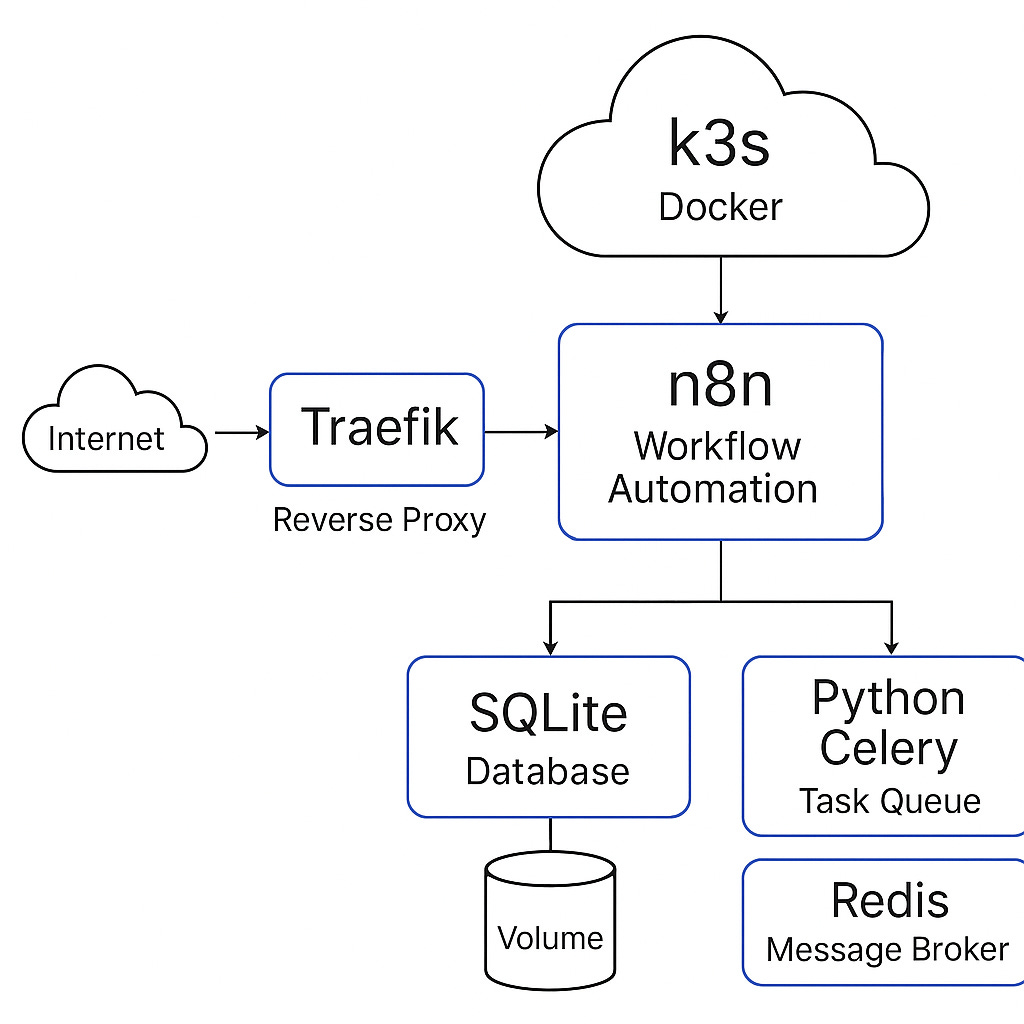
This architecture leverages Docker containers orchestrated by k3s (a lightweight Kubernetes distribution) to deploy and manage services. Traefik serves as the reverse proxy, handling HTTPS and routing traffic to the appropriate services. n8n is used for workflow automation, with SQLite as its database. Python Celery manages background tasks, and Redis acts as the message broker.
📌 Components:
Traefik (Reverse Proxy)
Handles incoming HTTP/HTTPS requests.
Routes traffic to the appropriate services based on domain names or paths.
Automatically manages SSL certificates via Let's Encrypt.YouTube+1Medium+1
n8n (Workflow Automation)
Provides a visual interface to automate tasks and integrate various services.
Runs inside a Docker container.Medium+1tanyongsheng.com+1
SQLite (Database)
Lightweight, file-based database used by n8n to store workflows and data.
Mounted as a volume to persist data.
Python Celery (Task Queue)
Handles asynchronous background tasks.
Works in conjunction with Redis as a message broker.
Redis (Message Broker)
Facilitates communication between n8n and Celery.
Queues tasks for Celery workers to process.n8n Docs+2Reddit+2DEV Community+2
k3s (Lightweight Kubernetes)
Orchestrates Docker containers.
Manages deployment, scaling, and networking of services.
Deployment Steps
Set Up k3s Cluster
Install k3s on your server to manage container orchestration.
Deploy Traefik
Configure Traefik as the ingress controller in k3s.
Set up domain routing and SSL certificate management.
Deploy n8n
Create a Docker container for n8n.
Mount a volume for the SQLite database to persist data.
Set Up Redis and Celery
Deploy Redis as a service in k3s.
Deploy Celery workers configured to use Redis as the broker.
Configure Networking
Ensure Traefik routes traffic to the n8n service.
Expose necessary ports and set up DNS records for your domain.
This setup provides a scalable and efficient environment for automating workflows using n8n, managing background tasks with Celery, and ensuring secure and reliable access through Traefik.
If you need assistance with specific configuration files or further customization, feel free to ask!